8 min to read
Agent vs. No-Agent: A Production Decision Guide
Part 3: The AI Tooling Decision Framework
Part 1 of this series introduced the three-ring model: raw API calls, orchestration pipelines, and agents. Part 2 covered AI ETL — a domain that lives firmly in Ring 2. Now we go deeper on the agent question, because “when to build an agent” is the decision that gets the most people into trouble.
The hype cycle around agents is real. Demos look impressive. The idea of an AI that handles the whole task — researching, reasoning, taking action, self-correcting — is genuinely compelling. But production is where the demo ends and the actual engineering begins, and the engineering cost of agents is higher than most teams expect.
This post is about making the decision honestly, with the failure modes in front of you.
What an Agent Actually Is (In Practice)
Strip away the marketing and an agent is a loop:
while not done:
    action = model.decide(context, tools, history)
    result = execute(action)
    context.append(result)
    if action == "finish":
        done = True
The model sees a growing context window, picks a tool or declares completion, and the loop runs again. That’s it. The “intelligence” is entirely in the model’s ability to plan across steps and recover from bad results.
Two things follow from this definition:
- Every iteration is a new LLM call. A 10-step agent task costs 10x what a single call costs, plus tool execution overhead.
- The context window grows with each step. A long-running agent that accumulates 50k tokens of history before finishing is a different cost profile than a two-step chain.
The Failure Modes No One Talks About
1. Failure mid-task with side effects
A no-agent pipeline that fails on step 3 of 5 fails cleanly — you fix the bug and rerun. An agent that fails on step 7 of 12 may have already sent an email, created a Jira ticket, and modified a database record. You now have a partial-state problem.
The fix is idempotent tools and explicit checkpoints — but that’s additional engineering that naive agent implementations skip.
2. Runaway loops
Without hard iteration limits, an agent that can’t complete a task can loop forever, burning tokens and potentially hammering external APIs. Always set a maximum step count and enforce it outside the model’s control.
MAX_STEPS = 20

for step in range(MAX_STEPS):
    action = agent.step(context)
    if action.type == "finish":
        return action.result
    context = execute_and_append(context, action)

raise AgentTimeoutError(f"Agent did not complete in {MAX_STEPS} steps")
3. Hallucinated tool calls
Models sometimes call tools with fabricated arguments — a file path that doesn’t exist, an API parameter that isn’t valid. Your tool implementations need to handle this gracefully and return clear error messages the model can reason about, not exceptions that crash the loop.
4. Context collapse
Long-running agents accumulate context. At some point, earlier information gets pushed out of the effective attention window, and the model starts forgetting constraints it was given at step 1. Tasks that require coherent long-horizon memory are harder than they look.
5. Evaluation is hard
A deterministic pipeline passes or fails. An agent produces outputs that require human judgment to evaluate — did it do the right thing? In the right order? With the right reasoning? Building eval infrastructure for agents is a project in itself.
The Five Questions
Answer these before choosing agent architecture:
1. Can you enumerate the steps before runtime?
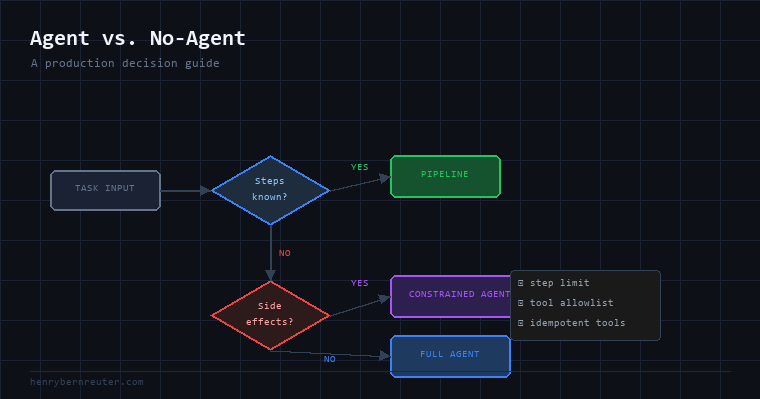
Write out what the task requires. If you can draw a flowchart where every branch is known — not “depends on what the model finds” — you have a pipeline, not an agent task. Build the pipeline.
2. Does the task require real tool selection?
Not “I need to call a tool” but “I don’t know which tool to call until I see intermediate results.” An agent that always calls tools in the same order isn’t really an agent — it’s a chain with extra ceremony.
3. What happens when it fails mid-task?
If the answer involves database rollbacks, API undos, and manual cleanup, you need to design for that before you ship. If you haven’t thought through failure recovery, you’re not ready to build the agent.
4. What’s the acceptable cost per task?
A 15-step agent using Sonnet on a task with 2k tokens of context per step costs roughly $0.15–$0.30 per run. At 10,000 runs/day that’s $1,500–$3,000/day. Do the math before you build.
5. Is there a human in the loop?
Human-in-the-loop dramatically changes the risk profile. An agent that drafts and waits for approval before acting is much safer than one that acts autonomously. If your use case allows for checkpoints, use them — especially in early production.
When to Build the Agent
You should build an agent when you can say yes to all three of these:
- The task genuinely requires dynamic tool selection based on intermediate results
- The failure modes are acceptable and recoverable, or you’ve engineered around them
- A non-agent solution would require you to pre-specify logic that is genuinely unknowable before runtime
Real examples that pass this test:
- A code debugging assistant that reads error output, forms a hypothesis, writes a fix, runs tests, and iterates
- A competitive research tool that searches, identifies gaps, decides what additional data it needs, and synthesizes a report
- An IT operations agent that reads monitoring alerts, checks related systems, and decides which runbook to execute
When NOT to Build the Agent
You should not build an agent when:
The steps are fixed. If you know the sequence — fetch data, run model, validate output, store — build a pipeline. Agents add overhead without benefit when the control flow is predetermined.
You want consistency. Agents are non-deterministic not just in output but in path. The same task may take 3 steps one run and 9 steps another. If you need reproducibility, agents make debugging and auditing harder.
Cost matters and volume is high. An agent that does what a two-call chain could do is strictly more expensive. At scale, the difference is material.
Your tools have irreversible effects. Sending emails, posting to production databases, making financial transactions — these need explicit human approval or bulletproof idempotency. If you can’t provide that, don’t give an agent access to those tools yet.
You’re still in early product development. Agents are harder to iterate on than pipelines. If the requirements are still changing, build the simpler thing first. You can always add agentic behavior later when you know exactly where you need it.
A Practical Pattern: Constrained Agents
The middle ground that works well in production is a constrained agent — one where you’ve hardened the boundaries while preserving dynamic decision-making where you actually need it.
TOOLS = [search_web, read_document, summarize, finish]
MAX_STEPS = 10
ALLOWED_DOMAINS = ["internal.company.com", "trusted-source.com"]

def run_research_agent(query: str) -> str:
    context = [{"role": "user", "content": query}]

    for step in range(MAX_STEPS):
        response = client.messages.create(
            model="claude-sonnet-4-6",
            tools=TOOLS,
            messages=context,
            system=SYSTEM_PROMPT
        )

        if response.stop_reason == "end_turn":
            return extract_final_answer(response)

        tool_call = response.content[0]

        # validate before executing
        if not is_allowed(tool_call, ALLOWED_DOMAINS):
            context.append({"role": "tool", "content": "Action not permitted."})
            continue

        result = execute_tool(tool_call)
        context.append({"role": "tool", "content": result})

    return "Task incomplete: maximum steps reached."
The agent picks its own tools and path, but you’ve constrained:
- Which tools exist (limited, validated set)
- What those tools can access (domain allowlist)
- How long it can run (hard step limit)
- What happens when it exceeds limits (graceful fallback, not crash)
This pattern ships to production more reliably than an unconstrained agent while preserving the dynamic reasoning you actually need.
Summary
| Signal | Build an Agent | Don’t Build an Agent |
|---|---|---|
| Control flow | Unknown until runtime | Fixed / enumerable |
| Tool selection | Data-dependent | Predetermined |
| Failure recovery | Designed for | Not considered |
| Cost profile | Acceptable per task | Too expensive at volume |
| Side effects | Reversible / idempotent | Irreversible |
| Evaluation | Have a plan | “We’ll check manually” |
Agents are a powerful tool. They’re also the most expensive, most complex, and hardest-to-debug option in your toolkit. Use them where dynamic reasoning genuinely earns its keep, and build constrained pipelines everywhere else.
Next: the infrastructure question — when it makes more sense to download and run your own model than to call an API.