9 min to read
MCP and A2A in One Post
Every AI tool needed its own custom integration. Then Anthropic published a spec, and the whole industry had to decide whether to follow it.
By 2024, every team building AI applications was solving the same problem independently. How do you give a language model access to your internal tools? How does it search your documentation, query your database, send a Slack message, call your APIs?
The answer, for most teams, was to write custom code. You’d define a function, describe it in JSON for the model’s tool-use API, write the implementation, handle errors, manage authentication, and wire it all together in your specific application. If you used Claude and wanted to switch to GPT-4, you rewrote the integration. If you wanted the same tool available in a different app, you copied the code. If a tool changed its API, you updated every integration separately.
There was no standard. Every integration was a one-off. The result was a fragmented ecosystem where the same tools were being integrated with the same models by thousands of different teams, each writing slightly different code to accomplish the same thing.
On November 25, 2024, Anthropic published the Model Context Protocol.
The Problem MCP Solved
Think about how USB changed hardware. Before USB, every peripheral — keyboard, mouse, printer, camera — had its own connector, its own driver, its own installation ritual. Adding a new device to a computer was a project. USB introduced one standard connection. Now you plug in any device from any manufacturer and it works.
MCP is trying to do the same thing for AI tools.
Before MCP, connecting an AI model to a tool meant:
- Defining the tool schema in whatever format the model’s API expected (different for Claude, GPT, Gemini)
- Writing custom code to handle the model’s tool call
- Implementing authentication for that specific tool
- Managing the connection in your application
After MCP, the tool exposes itself as an MCP server. The AI application connects to any MCP server using the same protocol. Write the server once; any compatible model or application can use it.
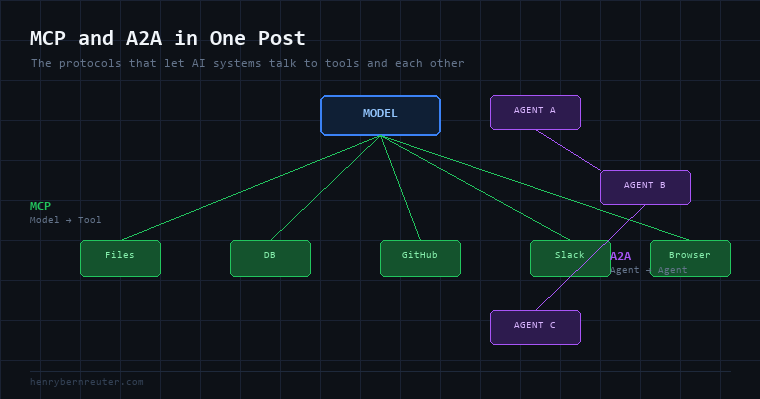
The spec was published as open source. Within weeks, the developer community started building MCP servers for everything: file systems, databases, GitHub, Slack, Notion, Google Drive, Jira, Postgres, web browsers. By early 2025, there were hundreds of community-built servers and every major AI company had either adopted the spec or announced support.
What MCP Actually Is
MCP is a client-server protocol that runs over standard transport layers (stdio for local, HTTP/SSE for remote). An MCP server exposes three types of capabilities:
- Tools — functions the model can call (search the web, write a file, query a database)
- Resources — data the model can read (files, database records, API responses)
- Prompts — reusable prompt templates the server makes available
An MCP client (your AI application, Claude Desktop, Cursor, etc.) connects to one or more servers and makes their capabilities available to the model.
# Building an MCP server — the server side
from mcp.server import Server
from mcp.server.stdio import stdio_server
from mcp import types

app = Server("my-database-tools")

@app.list_tools()
async def list_tools() -> list[types.Tool]:
    return [
        types.Tool(
            name="query_database",
            description="Run a read-only SQL query against the production database",
            inputSchema={
                "type": "object",
                "properties": {
                    "sql": {"type": "string", "description": "The SQL query to run"},
                },
                "required": ["sql"]
            }
        )
    ]

@app.call_tool()
async def call_tool(name: str, arguments: dict) -> list[types.TextContent]:
    if name == "query_database":
        result = await run_query(arguments["sql"])
        return [types.TextContent(type="text", text=str(result))]

async def main():
    async with stdio_server() as streams:
        await app.run(*streams, app.create_initialization_options())
# Using an MCP server — the client side
import anthropic
from anthropic import Anthropic

client = Anthropic()

# Claude Desktop handles MCP connection automatically via config
# For custom apps, use the MCP client library
response = client.messages.create(
    model="claude-sonnet-4-6",
    max_tokens=1024,
    tools=mcp_tools,  # tools loaded from connected MCP servers
    messages=[{"role": "user", "content": "How many users signed up last week?"}]
)
The model decides to use the query_database tool, constructs the SQL, the MCP client executes it against your server, the result comes back, and the model synthesizes an answer. Your database never needed to know which model asked the question.
The MCP Ecosystem
The protocol took off faster than most expected. Claude Desktop supports MCP out of the box — you add servers to a JSON config file and they’re immediately available. Cursor (the AI code editor) added MCP support. VS Code added it. The pattern caught on: tool capability is becoming a first-class part of the AI stack.
Community-built MCP servers exist for:
- Databases: Postgres, MySQL, SQLite, MongoDB
- Developer tools: GitHub, GitLab, Jira, Linear, Sentry
- Productivity: Notion, Google Drive, Slack, Gmail, Calendar
- Browsers: Puppeteer, Playwright (giving AI agents browsing capability)
- Infrastructure: AWS, Kubernetes, Docker
- Custom: Anything with an API can be an MCP server
For a data engineer or AI developer, the practical upside is significant. You build the MCP server for your internal tools once, and any MCP-compatible client — Claude, Cursor, your custom agent — can use it without additional integration work.
A2A: When Agents Need to Talk to Each Other
MCP solves the model-to-tool problem. A different problem emerged as agent deployments scaled: agents need to talk to other agents.
In April 2025, Google published the Agent-to-Agent (A2A) protocol — with backing from 50+ companies including Salesforce, SAP, Deloitte, and Accenture.
The problem A2A addresses is agent orchestration at scale. Imagine a procurement agent that needs to check inventory (inventory agent), get pricing (pricing agent), and approve the order (approval agent). How do those agents find each other? How does one agent hand a task to another and get the result back? How do you handle authentication between agents that may be built by different teams on different platforms?
A2A answers these questions with an HTTP-based protocol where:
- Each agent publishes an Agent Card — a JSON document describing its capabilities, the tasks it can handle, and how to call it
- Agents communicate via tasks — structured requests with defined states (submitted, working, completed, failed)
- Results are returned as artifacts — structured outputs that the receiving agent can parse
// An Agent Card — how an agent advertises itself
{
  "name": "inventory-agent",
  "description": "Checks product inventory and availability",
  "url": "https://internal.company.com/agents/inventory",
  "version": "1.0.0",
  "capabilities": {
    "streaming": true,
    "pushNotifications": false
  },
  "skills": [
    {
      "id": "check_inventory",
      "name": "Check Inventory",
      "description": "Returns current stock levels for a given product ID",
      "inputModes": ["text"],
      "outputModes": ["text", "data"]
    }
  ]
}
# Calling another agent via A2A
import httpx

async def check_inventory(product_id: str) -> dict:
    async with httpx.AsyncClient() as client:
        response = await client.post(
            "https://internal.company.com/agents/inventory",
            json={
                "id": "task-001",
                "message": {
                    "role": "user",
                    "parts": [{"text": f"Check inventory for product {product_id}"}]
                }
            }
        )
        return response.json()
The practical goal is an ecosystem where enterprise AI agents can be discovered, composed, and orchestrated — regardless of which model they use or which platform they’re deployed on.
MCP vs A2A: Not the Same Problem
These two protocols are often mentioned together but solve different things:
| MCP | A2A | |
|---|---|---|
| What connects | Model ↔ Tool | Agent ↔ Agent |
| Direction | Model calls tool | Agent delegates to agent |
| State | Stateless tool calls | Stateful task lifecycle |
| Discovery | Config file | Agent cards (URL-addressable) |
| Who built it | Anthropic | Google (+ 50 partners) |
| Adoption | Widespread (late 2024–2025) | Growing (2025–2026) |
They’re complementary. An agent built with MCP (to call tools) might also implement A2A (to receive tasks from other agents and delegate subtasks to specialized agents). The two protocols operate at different layers of the stack.
Why This Matters
The boring answer is that standards reduce integration work. The more interesting answer is that MCP and A2A are laying the foundation for a world where AI capabilities are composable — where you can snap together models, tools, and agents built by different teams the same way you snap together APIs.
Whether A2A achieves the same adoption as MCP remains to be seen. Google’s enterprise backing gives it credibility. Anthropic’s developer-first rollout of MCP gave it momentum. What both protocols share is the recognition that the proliferation of AI systems eventually requires a common language — and that whoever defines that language early shapes the architecture of what gets built next.