10 min to read
Databricks Step by Step: Train and Register a Model
The model worked on your laptop. Then someone asked which version is in production, and nobody knew.
Here’s a story most data scientists can tell.
You train a model. It’s good. You save it as model_final.pkl. A month later you retrain it with better features and save model_final_v2.pkl. Then a teammate tweaks a parameter and saves model_final_v2_fixed.pkl. Six months later production starts making strange predictions, and the only question that matters, which model is running and what data trained it, has no answer.
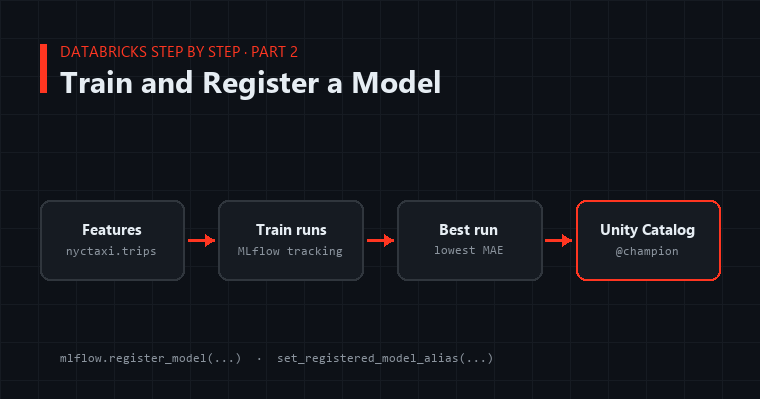
Databricks solves this with two tools that work together. MLflow records every training run: the parameters, the metrics, the code, and the model itself. Unity Catalog stores the models you decide to keep, with version numbers, permissions, and named aliases like champion that point at whichever version is live.
This is part 2 of Databricks Step by Step. Part 1 built a data pipeline. This post trains a model, tracks it, and registers it so it’s ready to deploy in part 3.
What We’re Building
We’ll predict taxi fares from trip details, using the samples.nyctaxi.trips table that comes with Databricks. It’s a small, real dataset with an obvious target, which makes it perfect for learning the workflow.
 samples.nyctaxi.trips
        │
        ▼
  feature engineering ──► train 3 candidate models ──► MLflow tracks every run
                                                              │
                                                              ▼
                                            best run ──► Unity Catalog model
                                                          main.ml.taxi_fare
                                                          version 1  @champion
Run everything below in a Databricks notebook on a cluster with the ML runtime, which comes with MLflow and scikit-learn already installed.
Step 1: Point MLflow at Unity Catalog
import mlflow

mlflow.set_registry_uri("databricks-uc")
mlflow.set_experiment("/Users/you@example.com/taxi-fare")   # use your own path

CATALOG, SCHEMA = "main", "ml"
MODEL_NAME = f"{CATALOG}.{SCHEMA}.taxi_fare"

spark.sql(f"CREATE SCHEMA IF NOT EXISTS {CATALOG}.{SCHEMA}")
In MLflow 3, databricks-uc is already the default registry, but setting it explicitly costs nothing and makes the notebook’s intent obvious to the next reader. The experiment is a folder for runs. Every training attempt in this notebook lands there.
Step 2: Build Features
from pyspark.sql import functions as F

trips = spark.read.table("samples.nyctaxi.trips")

features = (
    trips
    .where("fare_amount > 0 AND fare_amount < 200 AND trip_distance > 0")
    .select(
        "trip_distance",
        F.hour("tpep_pickup_datetime").alias("pickup_hour"),
        F.dayofweek("tpep_pickup_datetime").alias("pickup_dow"),
        "pickup_zip",
        "dropoff_zip",
        "fare_amount",
    )
    .dropna()
)

pdf = features.toPandas()
print(f"{len(pdf):,} trips")
The where clause does real work. Taxi data contains zero fares, negative fares, and the occasional $5,000 “trip” from a mistyped meter. A model trained on that noise learns noise. Filtering it is the single biggest accuracy improvement in this whole post.
This dataset is small enough for pandas. For tables in the hundreds of millions of rows, you’d keep the work in Spark or sample first. The MLflow steps below stay the same either way.
Step 3: Train and Track Candidate Models
from sklearn.model_selection import train_test_split
from sklearn.ensemble import HistGradientBoostingRegressor
from sklearn.metrics import mean_absolute_error
from mlflow.models import infer_signature

X = pdf.drop(columns=["fare_amount"])
y = pdf["fare_amount"]
X_train, X_test, y_train, y_test = train_test_split(X, y, test_size=0.2, random_state=42)

candidates = [
    {"max_depth": 3, "learning_rate": 0.1},
    {"max_depth": 6, "learning_rate": 0.1},
    {"max_depth": 8, "learning_rate": 0.05},
]

for params in candidates:
    with mlflow.start_run(run_name=f"hgb-depth{params['max_depth']}"):
        model = HistGradientBoostingRegressor(**params, random_state=42)
        model.fit(X_train, y_train)

        mae = mean_absolute_error(y_test, model.predict(X_test))

        mlflow.log_params(params)
        mlflow.log_metric("test_mae", mae)
        mlflow.sklearn.log_model(
            model,
            name="model",
            signature=infer_signature(X_test, model.predict(X_test)),
            input_example=X_test.head(5),
        )
        print(f"{params} -> MAE ${mae:.2f}")
Three things to notice:
- Every run is recorded. Open the experiment in the sidebar and you’ll see all three runs side by side, sortable by
test_mae. Nothing lives only in your notebook’s output anymore. - The signature is required. Unity Catalog only accepts models that declare their inputs and outputs.
infer_signaturereads them from real data, so the model knows it expectstrip_distance,pickup_hour, and the rest, and returns a number. That signature is what lets part 3 serve it as an API without extra glue code. - The input example travels with the model. Anyone who picks the model up later can see exactly what a valid request looks like.
Step 4: Pick the Best Run and Register It
best = mlflow.search_runs(order_by=["metrics.test_mae ASC"], max_results=1).iloc[0]
print(f"Best run {best.run_id}: MAE ${best['metrics.test_mae']:.2f}")

registered = mlflow.register_model(f"runs:/{best.run_id}/model", MODEL_NAME)
print(f"Registered {MODEL_NAME} version {registered.version}")
The model now exists in Unity Catalog as main.ml.taxi_fare, version 1. Open Catalog in the sidebar and find it under main → ml. You’ll see the version, the run that produced it, its signature, and who can access it.
Registering is a decision, not a side effect. You train many runs and register the few worth keeping. That separation keeps the registry clean.
Step 5: Mark It Live with an Alias
Version numbers say what a model is. Aliases say what it’s for.
from mlflow import MlflowClient

client = MlflowClient()
client.set_registered_model_alias(MODEL_NAME, "champion", registered.version)
Now anything that needs “the production model” asks for it by alias:
champion = mlflow.pyfunc.load_model(f"models:/{MODEL_NAME}@champion")
champion.predict(X_test.head())
This is the habit that prevents the model_final_v2_fixed.pkl story. Batch scoring jobs, dashboards, and notebooks all load @champion. When a better model comes along, you move the alias, and every consumer picks up the new version without a single code change. If the new version misbehaves, you move the alias back. Rollback takes one line.
Step 6: The Retraining Loop
Models go stale as the world changes. Here’s the pattern for promoting a retrained model safely, as a challenger that has to beat the champion:
def promote_if_better(new_version: str, X_eval, y_eval) -> bool:
    champion = mlflow.pyfunc.load_model(f"models:/{MODEL_NAME}@champion")
    challenger = mlflow.pyfunc.load_model(f"models:/{MODEL_NAME}/{new_version}")

    champ_mae = mean_absolute_error(y_eval, champion.predict(X_eval))
    chall_mae = mean_absolute_error(y_eval, challenger.predict(X_eval))
    print(f"champion ${champ_mae:.2f} vs challenger ${chall_mae:.2f}")

    if chall_mae < champ_mae:
        client.set_registered_model_alias(MODEL_NAME, "champion", new_version)
        return True
    client.set_registered_model_alias(MODEL_NAME, "challenger", new_version)
    return False
Both models are scored on the same fresh data, so the comparison is fair. Put this notebook in a scheduled job, the same way part 1 scheduled the pipeline, and you have automated retraining that can never quietly ship a worse model.
Step 7: Control Who Can Use It
Because the model lives in Unity Catalog, permissions work like they do for tables:
GRANT EXECUTE ON FUNCTION main.ml.taxi_fare TO `data-analysts`;
Wait, a function? Unity Catalog groups models with functions for permission purposes. EXECUTE lets a group load and use the model without being able to change it. Your analysts can score with it, and only the ML team can register new versions. (The group also needs USE CATALOG on main and USE SCHEMA on main.ml to reach the model at all.)
What Can Go Wrong
“Model signature is required.” Unity Catalog rejects models logged without a signature. Pass signature= or input_example= to log_model, as above.
Predictions come back wrong after deployment. Nine times out of ten, the feature code at prediction time doesn’t match the feature code at training time. Keep feature logic in one function or table that both paths use.
Too many registered versions. Register only runs you would actually deploy. Experiments are for exploring, the registry is for decisions.
You can’t find a run from last month. Name runs (run_name=) and log the parameters you’d search by. Ten seconds of discipline at training time saves an hour of archaeology later.
Where This Goes Next
You have a trained, versioned, permissioned model with an alias that says which version is live. It can be loaded anywhere in Databricks with one line.
But most applications don’t live inside Databricks. They’re web apps and services that need predictions over HTTP. Next in the series: serving this model as a real-time API endpoint.