11 min to read
Databricks Step by Step: Build a RAG Chatbot
The company handbook is 400 pages. Everyone asks HR the same twelve questions. Let's fix that.
Every company has a version of this problem.
The answers exist. They’re in the employee handbook, the policy PDFs, the internal wiki. But nobody reads 400 pages to find out how many vacation days roll over, so they email HR. HR answers the same question for the hundredth time.
A chatbot that just asks a large language model won’t help, because the model has never seen your handbook. It will confidently invent a vacation policy. What you need is RAG, retrieval-augmented generation: find the right passages in your own documents first, then have the model answer from those passages.
I covered the idea in What Is RAG and Why Does Every AI App Use It? and built one from scratch in Build a RAG Pipeline From Scratch in Python. This post builds the same thing on Databricks, where the storage, search index, and model all live in one governed place.
This is part 4 of Databricks Step by Step.
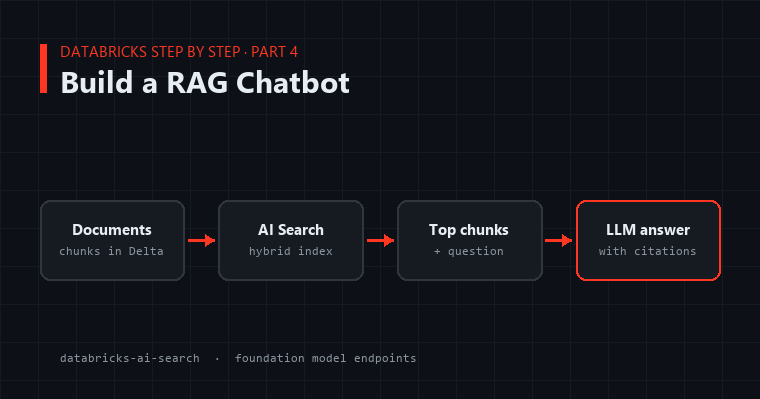
What We’re Building
 Documents ──► chunks table (Delta) ──► AI Search index ──┐
                                        (auto-synced)      │ top 5 chunks
                                                           ▼
 "How many vacation days      ──────────────────► prompt + chunks ──► LLM endpoint
  roll over?"                                                            │
                                                                         ▼
                                      "Up to 5 days roll over (Handbook, section 4.2)."
The pieces:
- A Delta table of chunks. Your documents, split into passages a few paragraphs long.
- AI Search (the product formerly called Vector Search). It embeds every chunk and keeps a searchable index in sync with the table.
- A foundation model endpoint. Databricks hosts models from several providers that you can call by name, paying per token.
Step 1: Chunk the Documents into a Delta Table
Models answer better from focused passages than from whole documents, so split each document into overlapping chunks:
import re

def chunk_text(text: str, max_words: int = 250, overlap: int = 40) -> list[str]:
    words = re.sub(r"\s+", " ", text).strip().split(" ")
    chunks, start = [], 0
    while start < len(words):
        end = start + max_words
        chunks.append(" ".join(words[start:end]))
        start = end - overlap
    return chunks
The overlap matters. Without it, a sentence that straddles two chunks gets cut in half, and neither chunk contains the full answer.
Now load your documents and write the chunks to a table. Here the documents are text files in a Unity Catalog volume. PDFs need a parsing step first, but the rest is identical:
docs = (
    spark.read.text("/Volumes/main/hr/handbook_files/", wholetext=True)
    .selectExpr("_metadata.file_name AS source", "value AS text")
    .collect()
)

rows = []
for doc in docs:
    for i, chunk in enumerate(chunk_text(doc.text)):
        rows.append((f"{doc.source}-{i}", doc.source, chunk))

chunks = spark.createDataFrame(rows, "id STRING, source STRING, text STRING")
chunks.write.mode("overwrite").saveAsTable("main.hr.handbook_chunks")
One more line, and it’s required: AI Search keeps the index in sync by reading the table’s change data feed, so turn it on.
ALTER TABLE main.hr.handbook_chunks
SET TBLPROPERTIES (delta.enableChangeDataFeed = true);
Step 2: Create the Search Index
Install the AI Search client in your notebook:
%pip install databricks-ai-search
dbutils.library.restartPython()
An endpoint is the compute that hosts indexes. Create one once and reuse it for many indexes:
from databricks.ai_search.client import AISearchClient

client = AISearchClient()
client.create_endpoint(name="rag-endpoint", endpoint_type="STANDARD")
Then create a Delta Sync index on the chunks table:
index = client.create_delta_sync_index(
    endpoint_name="rag-endpoint",
    source_table_name="main.hr.handbook_chunks",
    index_name="main.hr.handbook_index",
    pipeline_type="TRIGGERED",
    primary_key="id",
    embedding_source_column="text",
    embedding_model_endpoint_name="databricks-gte-large-en",
)
That last parameter is the convenient part. You don’t compute embeddings yourself. Databricks sends each chunk’s text through the named embedding model and stores the vectors in the index. It uses the same model to embed questions at query time, so questions and chunks are always compared in the same “language.”
TRIGGERED means the index updates when you tell it to (from the index page or the SDK), which is the cheaper choice for documents that change weekly. CONTINUOUS keeps it updated within seconds of every table change. The first build takes a few minutes. The index is ready when its status in Catalog shows it as online.
For production, Databricks recommends databricks-qwen3-embedding-0-6b on a provisioned endpoint. databricks-gte-large-en is a simple pay-per-token choice for getting started.
Step 3: Retrieve
index = client.get_index(index_name="main.hr.handbook_index")

def retrieve(question: str, k: int = 5) -> list[dict]:
    results = index.similarity_search(
        query_text=question,
        columns=["id", "source", "text"],
        num_results=k,
        query_type="hybrid",
    )
    rows = results["result"]["data_array"]
    return [{"source": r[1], "text": r[2]} for r in rows]

for hit in retrieve("How many vacation days roll over?"):
    print(hit["source"], "|", hit["text"][:100])
query_type="hybrid" combines meaning-based search with keyword search. Pure vector search is great at “time off carryover” matching “vacation rollover,” but it can miss exact terms like a policy number or a product code. Hybrid catches both, and it’s a sensible default for documents full of specific names.
Before you go any further, look at what comes back. If the right passage isn’t in the top 5, no model will produce the right answer. Most RAG quality problems are retrieval problems wearing an LLM costume.
Step 4: Generate the Answer
Now hand the retrieved chunks to a hosted model with clear instructions:
from mlflow.deployments import get_deploy_client

llm = get_deploy_client("databricks")

SYSTEM = (
    "You answer employee questions using ONLY the handbook excerpts provided. "
    "Cite the source file for each fact. If the excerpts don't contain the answer, "
    "say you don't know and suggest contacting HR. Never guess at policy."
)

def ask(question: str) -> str:
    hits = retrieve(question)
    context = "\n\n".join(f"[{h['source']}]\n{h['text']}" for h in hits)

    response = llm.predict(
        endpoint="databricks-claude-sonnet-4-6",
        inputs={
            "messages": [
                {"role": "system", "content": SYSTEM},
                {"role": "user", "content": f"Excerpts:\n{context}\n\nQuestion: {question}"},
            ],
            "max_tokens": 500,
        },
    )
    return response["choices"][0]["message"]["content"]

print(ask("How many vacation days roll over?"))
The system prompt is doing the most important work in the whole build. “Only the excerpts” plus “say you don’t know” is what turns a confident inventor into a careful assistant. An HR bot that admits it doesn’t know is useful. One that invents a policy is a liability.
The endpoint name is the only thing tying you to a particular model. Databricks hosts models from Anthropic, OpenAI, Google, Meta, and others under names like databricks-claude-sonnet-4-6 or databricks-gpt-5-mini. Swap the name and compare answers on the same questions. The Serving page lists every model available in your workspace.
Step 5: Test It Like You Mean It
Before anyone else uses it, write down 20 real questions people ask HR, along with the right answers, and run them all:
test_set = [
    ("How many vacation days roll over?", "5"),
    ("What is the parental leave policy?", "12 weeks"),
    # ... the questions HR actually gets
]

for question, expected in test_set:
    answer = ask(question)
    status = "OK  " if expected.lower() in answer.lower() else "MISS"
    print(f"{status} {question}")
This is crude, and that’s fine. It’s a smoke test that catches the big failures. For each miss, check retrieval first (was the right chunk in the top 5?) and the prompt second. Rerun the set after every change, so improving one answer never quietly breaks another. For more rigorous evaluation, MLflow has built-in tools for scoring RAG answers with an LLM judge, which are worth exploring once the basics work.
Step 6: Put It Where People Are
A function in a notebook isn’t a product yet. Databricks offers two paths:
- Deploy it as an agent. Package
askas an agent and deploy it as an endpoint that apps and chat interfaces can call. Databricks now recommends its Agent Bricks CLI for new agents. The older path, registering the agent in Unity Catalog and callingagents.deploy, still works on Model Serving. - Wrap it in an app. Databricks Apps can host a simple chat interface (Streamlit, Gradio, or Dash) that calls your function, with workspace sign-in built in.
Either way, keep the index fresh. Schedule a job that rewrites the chunks table when documents change and then triggers an index sync. Stale documents give confident, outdated answers, which is the worst kind of wrong.
What Can Go Wrong
The index won’t create. Check that change data feed is enabled on the source table and that the table has a unique primary key column.
Answers are vague or off-topic. Print the retrieved chunks. If they’re wrong, adjust chunk size (smaller chunks for FAQ-style documents, larger for narrative ones) or try hybrid search.
The bot answers questions it shouldn’t. Tighten the system prompt, and test it with questions the handbook doesn’t cover. The right answer to those is “I don’t know.”
Some employees shouldn’t see some documents. Store an access-level column with each chunk and pass a filter to similarity_search. Don’t rely on the prompt to keep secrets.
Where This Goes Next
Across four posts we’ve built the core of a modern data and AI platform: clean pipelines, tracked models, real-time serving, and a chatbot grounded in your own documents.
The last post in the series puts it all to work on a question many teams are facing right now: how to move machine learning models from AWS SageMaker to Databricks, step by step, without breaking production.