10 min to read
How to Architect an AI ETL Pipeline
Part 2: The AI Tooling Decision Framework
Traditional ETL is deterministic. You write rules, you run them, you get consistent output. Adding an LLM to that pipeline breaks the determinism assumption — and if you’re not careful, it breaks the pipeline budget too.
But unstructured data isn’t going anywhere. PDFs, emails, support tickets, contracts, call transcripts — none of it fits neatly into a row in Postgres without something intelligent in the middle. That’s the gap LLMs were built for, and AI-powered ETL is now a real production pattern at companies of every size.
The question isn’t whether to add AI to your data pipelines. It’s where to add it, how to contain the cost and variance, and how to keep the rest of the pipeline deterministic around the parts that aren’t.
The Standard AI ETL Stack
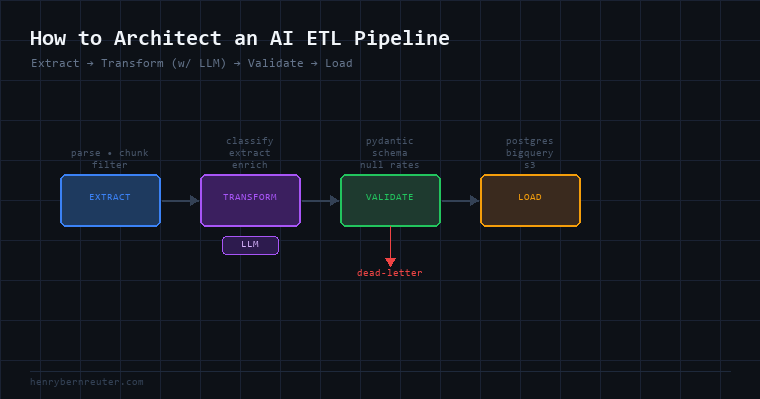
Before getting into design decisions, here’s what a mature AI ETL pipeline looks like at a high level:
[Source] → [Extract] → [Transform w/ LLM] → [Validate] → [Load]
              ↑                ↑                  ↑
         Parse/chunk      Enrich/classify     Schema check
         Ingest raw       Normalize            Retry on fail
         Handle formats   Structure output     Dead-letter queue
Every stage has distinct concerns. The LLM belongs in Transform — sometimes in Extract for parsing — and almost never in Load.
Extract: Handling Unstructured Inputs
The Extract stage is where raw data gets ingested and prepped for processing. This is where format diversity lives: a batch of PDFs, an S3 bucket of JSON blobs, a Postgres table with a notes TEXT column, an email inbox.
What belongs here (non-LLM):
- File parsing:
pypdf,python-docx,pdfplumber, Apache Tika - Chunking: split long documents into token-sized pieces for the model
- Deduplication: hash-based, before spending tokens on duplicates
- Basic filtering: file type checks, size limits, encoding normalization
When to bring in an LLM at Extract: Only when the raw format itself requires understanding to parse — OCR correction, handwriting interpretation, or extracting structure from HTML that varies too much for regex. Even then, run it as a pre-processing step on the raw text, not on the full document all at once.
Rule: Extract should be cheap and fast. If you’re spending tokens here, ask whether a deterministic parser could do the same job.
Transform: Where AI Does the Real Work
Transform is the core of an AI ETL pipeline. This is where you take chunked, clean text and produce structured output — classifications, extracted entities, summaries, normalized fields, sentiment scores, embeddings.
Pattern 1: Extraction to Schema
The most common pattern. You have unstructured text and you want a structured record.
import anthropic
import json

client = anthropic.Anthropic()

SYSTEM = """Extract the following fields from the contract text.
Return valid JSON matching this schema exactly:
{
  "party_a": string,
  "party_b": string,
  "effective_date": "YYYY-MM-DD",
  "value_usd": number | null,
  "jurisdiction": string
}
If a field cannot be determined, use null."""

def extract_contract(text: str) -> dict:
    response = client.messages.create(
        model="claude-sonnet-4-6",
        max_tokens=512,
        system=SYSTEM,
        messages=[{"role": "user", "content": text}]
    )
    return json.loads(response.content[0].text)
Key points:
- Hard schema in the system prompt. Don’t ask the model to “extract what’s relevant” — give it the exact field names and types.
- Short
max_tokens. You’re producing structured JSON, not prose. Cap it. - Parse and validate immediately. If
json.loads()fails, log and retry once with a correction message before sending to the dead-letter queue.
Pattern 2: Classification
Routing records into categories — support ticket triage, document type classification, intent detection.
CATEGORIES = ["billing", "technical", "account", "other"]

SYSTEM = f"""Classify the support message into exactly one category.
Categories: {', '.join(CATEGORIES)}
Respond with only the category name, nothing else."""

def classify(text: str) -> str:
    response = client.messages.create(
        model="claude-haiku-4-5-20251001",  # fast + cheap for classification
        max_tokens=10,
        system=SYSTEM,
        messages=[{"role": "user", "content": text}]
    )
    result = response.content[0].text.strip().lower()
    return result if result in CATEGORIES else "other"
Use Haiku for classification. It’s 20x cheaper than Sonnet and handles straightforward classification tasks well. Save Sonnet for extraction tasks that require reasoning.
Pattern 3: Enrichment
Adding fields that don’t exist in the source — sentiment, risk score, summary, keywords.
def enrich_review(text: str) -> dict:
    response = client.messages.create(
        model="claude-haiku-4-5-20251001",
        max_tokens=150,
        system="""Analyze the customer review. Return JSON:
{"sentiment": "positive"|"negative"|"neutral",
 "topics": [list of up to 3 keywords],
 "urgency": 1-5}""",
        messages=[{"role": "user", "content": text}]
    )
    return json.loads(response.content[0].text)
Batch vs. Real-Time Transform
| Batch | Real-Time | |
|---|---|---|
| Trigger | Schedule (cron/Airflow) | Event (Kafka, webhook, queue) |
| Latency | Minutes to hours | Sub-second to seconds |
| Cost | Predictable | Variable |
| Retry logic | Easy — rerun the job | Harder — need idempotency |
| Best for | Historical data, nightly loads | User-facing features, live enrichment |
For most AI ETL workloads, batch is the right default. Real-time adds operational complexity that’s only worth it if a human or system is waiting on the output.
Validate: The Layer Most People Skip
Validation is where AI ETL pipelines fall apart in production. LLMs are non-deterministic — the same input can produce slightly different output on two separate calls. Without validation, schema drift, hallucinated values, and malformed JSON will silently corrupt your downstream tables.
Minimum validation layer:
from pydantic import BaseModel, ValidationError
from datetime import date

class ContractRecord(BaseModel):
    party_a: str
    party_b: str
    effective_date: date
    value_usd: float | None
    jurisdiction: str

def safe_extract(text: str) -> ContractRecord | None:
    try:
        raw = extract_contract(text)
        return ContractRecord(**raw)
    except (json.JSONDecodeError, ValidationError) as e:
        log_failure(text, str(e))
        return None  # → dead-letter queue
Pydantic does the heavy lifting. Any record that fails validation goes to a dead-letter queue for human review — never silently dropped, never written to the destination with bad data.
Also validate:
- Null rates: if 40% of
value_usdfields are null when 5% is expected, something changed - Distribution drift: classification buckets shifting over time can indicate prompt regression
- Latency and token counts: sudden spikes mean your input size changed or the model is generating unexpectedly verbose output
Load: Keep It Dumb
The Load stage should be entirely deterministic. Take validated, structured records and write them to the destination. No LLM calls here.
Validated records → Postgres / Snowflake / BigQuery / S3 / Elasticsearch
If you find yourself calling an LLM at load time, that’s a design smell — the logic belongs in Transform or Validate.
Cost Architecture
AI ETL costs can blow up fast if you don’t design for them. The main levers:
1. Model selection by task complexity
| Task | Model | Why |
|---|---|---|
| Classification, routing | Haiku | Fast, cheap, handles binary/categorical tasks |
| Extraction, normalization | Sonnet | Better JSON reliability, handles ambiguous fields |
| Complex reasoning, synthesis | Opus | Reserve for cases where accuracy > cost |
2. Cache aggressively
If you’re processing similar documents repeatedly, prompt caching cuts costs significantly. The system prompt is the same across every call in a batch — cache it.
client.messages.create(
    model="claude-sonnet-4-6",
    system=[{"type": "text", "text": SYSTEM, "cache_control": {"type": "ephemeral"}}],
    messages=[{"role": "user", "content": chunk}],
    ...
)
3. Chunk strategically
Sending a 50-page PDF as one prompt is wasteful and likely to exceed the context window anyway. Chunk by semantic unit — paragraphs, sections, pages — and only send the chunks relevant to what you’re extracting.
4. Gate with cheap filters first
Run a fast regex or keyword check before sending to an LLM. If you’re extracting contract dates, skip any document that doesn’t contain date-like patterns. Filter out obvious non-matches without spending a token.
The Full Architecture Diagram
[Sources]          [Extract]          [Transform]        [Validate]    [Load]

S3 PDFs ─────→ pypdf + chunk ──→ claude-haiku ──→ pydantic ──→ Postgres
Emails ──────→ parse + clean ──→ (classify)  ──→ schema    ──→
Postgres ────→ select notes  ──→ claude-sonnet→ check      ──→ S3
API webhooks → normalize ────→ (extract)    ──→ null rates ──→ BigQuery
                                              ↓
                                        dead-letter queue
                                        (failed validation)
What to Watch in Production
- Dead-letter rate: Should be under 2%. Spikes mean your prompt or input changed.
- Token usage per record: Track this per document type. Drift means something upstream changed.
- Retry rate: How often are you re-calling after a validation failure? High retry rate means your prompt schema is too strict or the model is struggling with that document type.
- End-to-end latency: For batch jobs, track how long the Transform stage takes as a percentage of total run time. If it’s over 70%, you’re probably under-batching or not parallelizing LLM calls.
Summary
- Extract: deterministic parsers + chunking. LLM only for OCR or format ambiguity.
- Transform: where the AI lives. Extraction, classification, enrichment. Hard schemas, short
max_tokens, right model for the task. - Validate: Pydantic schemas + null rate monitoring + dead-letter queue. Non-negotiable.
- Load: dumb. No LLM. Write validated records and nothing else.
- Cost: Haiku for classification, Sonnet for extraction, prompt caching on system prompts, cheap filters before the LLM gate.
Next up: the agent question revisited — when the pipeline itself needs to make decisions, and where that crosses the line from orchestration into agency.