9 min to read
LangGraph in One Post
LangChain was built to chain LLM calls. Then real agents showed up, and chains weren't enough.
In October 2022, a twenty-six-year-old named Harrison Chase shipped the first version of LangChain as a side project on GitHub. He was a developer at Robust Intelligence, a machine learning security company, and he’d been experimenting with GPT-3 in his spare time. The repo had a simple idea: building useful things with language models required wiring together a lot of repetitive plumbing — API calls, prompt templates, output parsers, memory. Why not package that plumbing into a library?
The repo exploded. Within three months it was the fastest-growing open source project on GitHub. By early 2023 it had raised $10 million from Benchmark at a reported $200 million valuation — without a product, without revenue, just a library that developers were reaching for every time they wanted to build something with an LLM.
The chain metaphor made sense at the time. You prompt a model, get a response, pass it to the next step. Prompt → parse → retrieve → prompt again. Linear. Predictable. It worked for the demos everyone was building in 2022 and 2023.
Then real agents showed up.
Real agent workflows don’t flow in one direction. A coding assistant reads a file, writes a fix, runs the tests, reads the test output, decides whether the fix worked, and either continues or backtracks. That’s a loop. A research agent searches for information, decides it needs more, searches again, hits a dead end, changes strategy. That’s a graph — with cycles, branches, and state that persists across steps.
A chain couldn’t do that. So in January 2024, Harrison Chase and Nuno Campos — who had joined LangChain to lead the agent infrastructure work — shipped LangGraph.
The Problem with Chains
A LangChain chain executes like a conveyor belt. Data enters one end, passes through a fixed sequence of steps, exits the other. You define the sequence upfront. It never changes at runtime.
# The old way — a chain is a line
from langchain.chains import LLMChain
from langchain.prompts import PromptTemplate

chain = PromptTemplate(...) | llm | output_parser
result = chain.invoke({"question": "Summarize this document"})
This is fine for simple pipelines. But the moment you need:
- A loop that keeps going until the model decides it’s done
- A branch where the model picks one of several next steps
- State that persists across iterations — the model remembers what it tried before
- Multiple agents that hand off work to each other
…a chain falls apart. You’re back to writing control flow by hand, managing state in dictionaries, building your own loop logic. The framework stops helping.
LangGraph’s answer was to stop thinking about agent workflows as chains and start thinking about them as state machines.
What LangGraph Actually Is
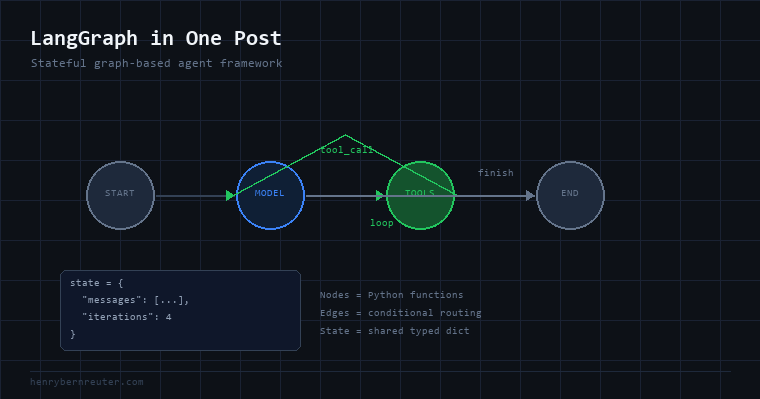
LangGraph models your agent as a directed graph where:
- Nodes are functions — Python code that does something (calls an LLM, executes a tool, validates output)
- Edges are transitions — deterministic paths or conditional branches that the model’s output decides
- State is a shared typed dictionary that every node can read and write
The graph runs like a state machine. You’re in a node, that node produces output, the output is written to state, an edge function looks at state and decides which node to go to next. Repeat until you hit the END node.
from typing import TypedDict, Annotated
from langgraph.graph import StateGraph, END
import operator

# 1. Define your state shape
class AgentState(TypedDict):
    messages: Annotated[list, operator.add]
    tool_calls: list
    iterations: int

# 2. Define nodes (each is just a function)
def call_model(state: AgentState) -> AgentState:
    response = llm.invoke(state["messages"])
    return {"messages": [response], "iterations": state["iterations"] + 1}

def call_tools(state: AgentState) -> AgentState:
    results = execute_tools(state["messages"][-1].tool_calls)
    return {"messages": results}

def should_continue(state: AgentState) -> str:
    last_message = state["messages"][-1]
    if last_message.tool_calls:
        return "tools"       # model wants to use a tool → go to tools node
    if state["iterations"] >= 10:
        return END           # hard limit → stop
    return END               # model finished → stop

# 3. Build the graph
workflow = StateGraph(AgentState)
workflow.add_node("model", call_model)
workflow.add_node("tools", call_tools)

workflow.set_entry_point("model")
workflow.add_conditional_edges("model", should_continue, {"tools": "tools", END: END})
workflow.add_edge("tools", "model")  # after tools, always go back to model

graph = workflow.compile()
That add_conditional_edges call is the key line. The model runs, produces a response, and should_continue inspects the state to decide where to go next. If the model called a tool, go run it. If it finished, stop. If it’s been running for 10 steps, force-stop.
This is the loop that chains couldn’t express.
State Persistence and Human-in-the-Loop
LangGraph’s state model unlocks something chains never had: you can pause the graph, save its state, and resume it later — possibly after a human has reviewed and approved an action.
from langgraph.checkpoint.memory import MemorySaver

# Compile with a checkpointer — saves state after every node
memory = MemorySaver()
graph = workflow.compile(checkpointer=memory)

# Run with a thread ID — state is saved under this ID
config = {"configurable": {"thread_id": "user-session-42"}}

result = graph.invoke(
    {"messages": [HumanMessage("Research OpenAI's latest model release")]},
    config=config
)

# Later — resume the same conversation with the same state
result = graph.invoke(
    {"messages": [HumanMessage("Now write a blog post about it")]},
    config=config
)
For production agents, you can interrupt the graph at any node and wait for human input before continuing:
workflow.compile(
    checkpointer=memory,
    interrupt_before=["send_email"]  # pause before any irreversible action
)
The graph pauses. A human reviews the draft email. They approve. The graph resumes. This is how you ship agents that handle high-stakes actions without fully removing humans from the loop.
Multi-Agent Graphs
Where LangGraph gets genuinely powerful is multi-agent architectures. Instead of one big agent doing everything, you compose specialized agents — each a subgraph — that hand work off to each other.
                    ┌─────────────┐
                    │  Supervisor │
                    └──────┬──────┘
                ┌──────────┴──────────┐
         ┌──────▼──────┐       ┌──────▼──────┐
         │  Researcher │       │   Writer    │
         └──────┬──────┘       └──────┬──────┘
                └──────────┬──────────┘
                     ┌─────▼─────┐
                     │  Reviewer │
                     └───────────┘
A supervisor agent reads the task and routes to a researcher or writer. The researcher gathers information and hands off to the writer. The writer drafts, hands to the reviewer. The reviewer either approves or sends back with feedback. Each of these is a node in the top-level graph — or a compiled subgraph that exposes the same interface.
What It’s Used For
LangGraph is the framework of choice when you need:
- Customer support agents that look up account data, file tickets, escalate to humans, and track conversation state across sessions
- Code generation pipelines that write code, run it, read the error, fix it, and iterate
- Research agents that search, assess whether they have enough information, and decide when to stop
- Document processing workflows where different document types route to different extraction logic
- Any agent where you need control — step limits, human approval gates, state persistence, audit logs
It’s not for simple single-call pipelines. If you can draw your logic as a straight line, use a chain or just write the code directly. LangGraph earns its keep when the control flow needs to respond to what the model actually does.
The Honest Tradeoffs
LangGraph has a steeper learning curve than basic LangChain. Defining state types, wiring edges, understanding how the checkpointer interacts with concurrent nodes — there’s a mental model to build.
The abstraction also adds a layer of indirection between you and your LLM calls. Debugging a graph means understanding which node ran, what state looked like at that point, and why an edge took a particular path. LangGraph Studio (their visual debugger) helps with this, but it’s still more complex than debugging a function that calls an API.
The tradeoff is worth it for production agent systems. The alternative — hand-rolling state machines, loop logic, and checkpointing in plain Python — is more work with less structure. LangGraph gives you a consistent vocabulary for problems that would otherwise produce inconsistent, hard-to-maintain code.
Harrison Chase’s side project became the default way to build production agents. Not because it’s the only way — but because agents are hard, and having a shared framework for the hard parts turns out to matter.