13 min to read
How to Move Machine Learning Models from SageMaker to Databricks
The data already lives in the lakehouse. The models still live somewhere else. Here's how to bring them home without breaking production.
The migration usually starts with a cost review.
The data team moved its tables to Databricks a year ago. Pipelines run there, analysts query there, features get built there. But the machine learning models still train and serve on SageMaker. Every night a job copies features out of the lakehouse into S3, so SageMaker can train on them, so its endpoints can answer requests, so the results can be copied back. Two platforms, two permission systems, two bills, and a lot of glue code that breaks on holidays.
Someone eventually asks: why are the models living somewhere else?
This post is the step-by-step answer for moving them. It’s the final part of Databricks Step by Step, and it leans on the earlier posts. If a step here feels quick, the full walkthrough is in building a pipeline, training and registering a model, or serving a model as an API.
First, Decide Whether You Should
Migration isn’t automatically right. It’s worth it when:
- Your training data already lives in Databricks, and you’re paying to copy it out.
- You want one place for permissions and lineage, from raw data to model to prediction.
- Your team already knows Databricks and is maintaining SageMaker on the side.
Think twice when your models depend deeply on AWS-only services (custom SageMaker containers wired into other AWS systems, for example), or when the SageMaker setup is stable, cheap, and owned by a team that likes it. “Consolidation” is a goal, not a reason to break something that works.
The Map: What Becomes What
Most SageMaker concepts have a direct counterpart:
| SageMaker | Databricks |
|---|---|
| Training jobs | Notebooks or Python scripts run as jobs, tracked with MLflow |
| Experiments (or managed MLflow) | MLflow experiments |
| Model Registry | Models in Unity Catalog, with versions and aliases |
| Real-time endpoints | Model Serving endpoints |
| Batch Transform | Batch scoring jobs with mlflow.pyfunc.spark_udf |
| Pipelines | Jobs with multiple tasks, and Lakeflow pipelines for the data |
| Feature Store | Feature tables in Unity Catalog |
| Model Monitor | Inference tables plus data quality monitoring |
Keep this table handy. Every step below is moving something from the left column to the right one.
Step 1: Inventory Everything
You can’t migrate what you haven’t listed. For each model, write down:
- The artifact. Where
model.tar.gzlives in S3, and what framework built it (scikit-learn, XGBoost, PyTorch, a custom container). - The inference code. Many SageMaker models ship with an
inference.pycontainingmodel_fn,input_fn,predict_fn, andoutput_fn. That code holds preprocessing logic you must carry over. - The endpoint. Instance type, autoscaling settings, and real traffic: requests per second at peak, and latency targets.
- The callers. Every app and service that calls the endpoint, and the exact request format each one sends.
- The training job. Where its data comes from, how often it reruns, and who triggers it.
A short script lists the endpoints for you:
import boto3

sm = boto3.client("sagemaker")
for ep in sm.list_endpoints()["Endpoints"]:
    config = sm.describe_endpoint_config(EndpointConfigName=ep["EndpointName"])
    for variant in config["ProductionVariants"]:
        model = sm.describe_model(ModelName=variant["ModelName"])
        print(ep["EndpointName"], variant.get("InstanceType"),
              model["PrimaryContainer"].get("ModelDataUrl"))
The callers list is the one teams skip, and it’s the one that bites at cutover. Search your codebases for the endpoint names.
Step 2: Choose a Path for Each Model
Every model takes one of two paths:
Path A: Repackage. Take the existing trained artifact and wrap it as an MLflow model. It’s fast, and predictions stay identical to production. Choose this for models that are stable and rarely retrained.
Path B: Retrain. Move the training code to Databricks and train fresh on lakehouse data. It’s more work, but you get rid of the S3 copying for good. Choose this for models retrained regularly. They have to move eventually, so move them properly.
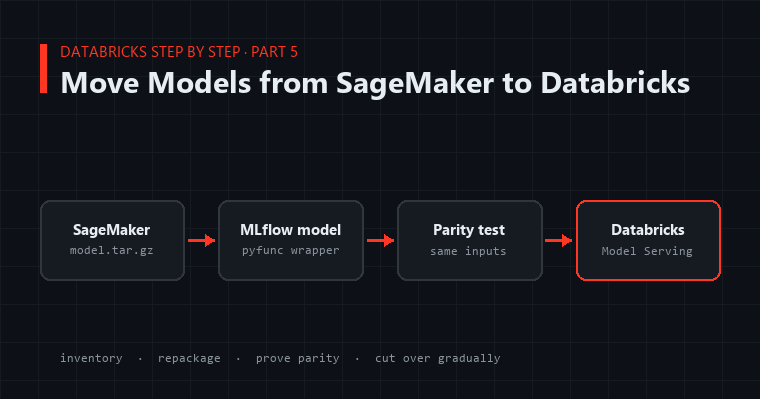
A common plan: repackage everything first to get off SageMaker endpoints quickly, then move training for the frequently retrained models one at a time.
Step 3: Repackage a SageMaker Artifact as an MLflow Model
Here’s Path A for a typical scikit-learn model with a custom inference.py. First, pull the artifact down from S3:
import boto3, tarfile, os

s3 = boto3.client("s3")
s3.download_file("my-ml-bucket", "models/churn/model.tar.gz", "/tmp/model.tar.gz")

os.makedirs("/tmp/churn_model", exist_ok=True)
with tarfile.open("/tmp/model.tar.gz") as tar:
    tar.extractall("/tmp/churn_model")

print(os.listdir("/tmp/churn_model"))   # e.g. ['model.joblib']
On Databricks, the cleaner long-term option is to give the workspace governed access to that bucket through a Unity Catalog external location, rather than passing AWS keys around. Either way, never paste credentials into a notebook.
Next, translate the SageMaker inference functions into an MLflow PythonModel. The mapping is direct: model_fn becomes load_context, and input_fn + predict_fn + output_fn become predict.
import mlflow
import pandas as pd
import joblib

class ChurnModel(mlflow.pyfunc.PythonModel):

    def load_context(self, context):
        # Was model_fn() in inference.py
        self.model = joblib.load(context.artifacts["model_file"])

    def predict(self, context, model_input: pd.DataFrame) -> pd.DataFrame:
        # Was input_fn() + predict_fn(): carry over ALL preprocessing exactly
        X = model_input.copy()
        X["tenure_years"] = X["tenure_months"] / 12
        X = X[["tenure_years", "monthly_charges", "support_tickets"]]
        return pd.DataFrame({"churn_probability": self.model.predict_proba(X)[:, 1]})
The preprocessing lines are the most important part of the migration. Copy them from inference.py exactly, including the odd-looking ones. That strange rounding step someone added in 2023 is probably fixing a real problem.
Now log and register it with a signature, using a real sample of production inputs:
from mlflow.models import infer_signature

mlflow.set_registry_uri("databricks-uc")

sample = pd.DataFrame({
    "tenure_months": [3, 48],
    "monthly_charges": [79.5, 42.0],
    "support_tickets": [4, 0],
})

with mlflow.start_run(run_name="churn-repackaged-from-sagemaker"):
    wrapper = ChurnModel()
    info = mlflow.pyfunc.log_model(
        name="model",
        python_model=wrapper,
        artifacts={"model_file": "/tmp/churn_model/model.joblib"},
        input_example=sample,
        pip_requirements=["scikit-learn==1.3.2", "pandas", "joblib"],
        registered_model_name="main.ml.churn",
    )
    mlflow.set_tag("migrated_from", "sagemaker:churn-endpoint-prod")
Two details that save pain:
- Pin the framework version to whatever trained the artifact (check the SageMaker container or training job). A pickled model loaded with a different scikit-learn version can quietly change its predictions.
- Tag where it came from. Six months from now,
migrated_fromtells everyone the history.
If the model was already tracked with MLflow (SageMaker offers managed MLflow), it’s even simpler. The artifact is already an MLflow model. Download it and register it directly, or use the open-source mlflow-export-import tool to move runs and models in bulk.
Step 4: Serve It
Point a Model Serving endpoint at the new Unity Catalog model, exactly as in part 3. Match the size to the traffic numbers from your inventory:
from databricks.sdk import WorkspaceClient
from databricks.sdk.service.serving import EndpointCoreConfigInput, ServedEntityInput

w = WorkspaceClient()
w.serving_endpoints.create_and_wait(
    name="churn",
    config=EndpointCoreConfigInput(
        served_entities=[
            ServedEntityInput(
                name="churn-v1",
                entity_name="main.ml.churn",
                entity_version="1",
                workload_size="Small",
                scale_to_zero_enabled=False,   # production: no cold starts
            )
        ]
    ),
)
Step 5: Prove Parity Before Anyone Switches
This is the step that makes migrations boring, and boring is the goal. Send the same inputs to both endpoints and compare:
import json
import os
import numpy as np
import requests

host = os.environ["DATABRICKS_HOST"]
token = os.environ["DATABRICKS_TOKEN"]
runtime = boto3.client("sagemaker-runtime")

def sagemaker_predict(df):
    resp = runtime.invoke_endpoint(
        EndpointName="churn-endpoint-prod",
        ContentType="application/json",
        Body=df.to_json(orient="records"),
    )
    return np.array(json.loads(resp["Body"].read())["predictions"])

def databricks_predict(df):
    resp = requests.post(
        f"{host}/serving-endpoints/churn/invocations",
        headers={"Authorization": f"Bearer {token}"},
        json={"dataframe_split": df.to_dict(orient="split", index=False)},
        timeout=30,
    )
    resp.raise_for_status()
    return np.array([p["churn_probability"] for p in resp.json()["predictions"]])

test = recent_production_inputs.sample(1000, random_state=7)   # real traffic, not synthetic
diff = np.abs(sagemaker_predict(test) - databricks_predict(test))

print(f"max diff {diff.max():.6f}, rows over tolerance: {(diff > 1e-6).sum()}")
Your SageMaker request and response formats will differ from this example. Each inference.py defines its own, which is exactly why the callers list matters. Adjust the two functions to match.
Use real recent inputs, including the messy ones: nulls, extreme values, new categories. A repackaged model should match to many decimal places. If it doesn’t, the cause is almost always one of three things: missed preprocessing, a different library version, or a column passed in a different order.
Step 6: Move Traffic Gradually
Cut over like you’d defuse something:
- Shadow. Callers still use SageMaker, but a copy of each request also goes to Databricks. Compare the results in production for a few days.
- Switch one caller. Start with the least critical one. Update its URL, request format, and authentication. Requests move from AWS signatures to a Databricks service principal.
- Switch the rest, one at a time, watching error rates and latency on the endpoint’s metrics page.
- Keep SageMaker running for a week or two after the last caller moves. It’s your rollback plan, and it’s cheap insurance.
- Decommission. Delete the SageMaker endpoint, then the endpoint config, then the model, so nothing is left accruing charges.
Step 7: Bring Training Over (Path B)
For models that retrain regularly, finish the job by moving training itself:
- Point the training code at the lakehouse tables directly. The nightly copy to S3 is the first thing you delete.
- Track runs with MLflow and register to Unity Catalog, as in part 2.
- Use the champion/challenger pattern so a retrain can never quietly ship a worse model.
- Schedule it as a job, with the data pipeline as an upstream task, so training always runs on fresh data.
Batch Transform jobs translate to a scheduled job that scores a table in parallel:
score = mlflow.pyfunc.spark_udf(spark, "models:/main.ml.churn@champion", result_type="double")

customers = spark.read.table("main.crm.active_customers")
(customers
    .withColumn("churn_probability", score("tenure_months", "monthly_charges", "support_tickets"))
    .write.mode("overwrite").saveAsTable("main.crm.churn_scores"))
No S3 staging, no output files to collect. The scores land in a table that dashboards and apps can read directly.
The Checklist
Before calling a model migrated:
- Inventory complete, including every caller
- Preprocessing from
inference.pycarried over and reviewed by someone who knows the model - Framework versions pinned to match the original training
- Registered in Unity Catalog with a signature, a
migrated_fromtag, and achampionalias - Endpoint sized from real traffic numbers
- Parity test passed on real recent inputs
- Every caller switched, with monitoring watched after each switch
- SageMaker kept as a rollback for an agreed period, then fully decommissioned
- Inference tables on, so the new endpoint is observable from day one
Closing the Series
Five posts ago, the raw data was JSON files in a folder. Since then we’ve built clean pipelines, tracked and versioned models, served them as APIs, built a chatbot grounded in real documents, and now moved models from another platform without breaking anything.
The common thread is that each step lands in the same governed place. Data, models, and predictions share one catalog, one permission system, and one lineage graph. That’s the real argument for migrating: not that Databricks is magic, but that every hop between platforms is a place for things to break, and the best migration is the one that removes hops.